Anime on YouTube
Translate anime on YouTube and hear it in your language
Open an official episode or clip, pick your language in AutoDub, and an AI voice reads the dialogue while the original audio dips into the background. AutoDub translates each line with AI, so the dialogue sounds like natural speech, not a word-for-word subtitle.
Free, no account needed. For Chrome, Edge, Brave and Firefox on your computer.
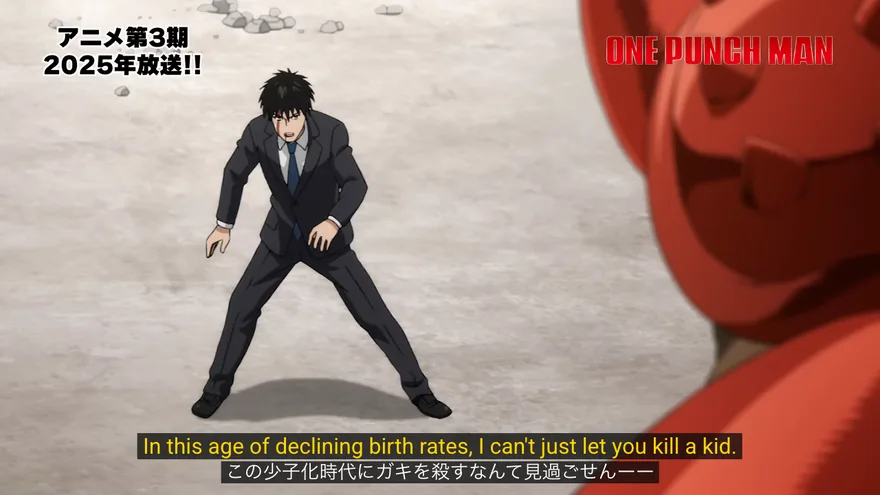
Official anime you can watch on YouTube
There’s more legit anime on YouTube than most people expect. Studios and publishers post first episodes, shorts and sometimes whole seasons, often with subtitles in several languages. Here’s what we opened on , and the subtitle tracks each player offered:
| Channel | What we opened, and what the player offered |
|---|---|
| Bandai Namco Filmworks | One-Punch Man, episode 1 (a limited-time anniversary upload) Japanese audio. Subtitles: Japanese, English. |
| Uma Musume official (ぱかチューブっ!) | Umamusume: Pretty Derby – Road to the Top, episode 1 Japanese audio. Subtitles: English, Korean, Chinese (Simplified and Traditional), auto-generated Japanese. |
| Pokémon official (Japan) | POKÉTOON short “幼なじみのカルボウ” Japanese audio. Subtitles: Japanese, English. |
| Tencent Video Animation | Coiling Dragon, episode 1 (donghua) Chinese audio. Subtitles: 13 languages, including Chinese, English, Spanish, Hindi and Arabic. |
| Yuewen Animation English | Battle Through the Heavens, episode 1 (donghua) Chinese audio. Subtitles: 23 languages, including English, Spanish, Russian and Hindi. |
Uploads like these come and go, and some channels publish only for certain countries, so an episode that plays for us may not play where you are. To find more, search the show’s name with “official” or “episode 1” and check that the channel belongs to the studio or publisher.
What AutoDub does with an anime episode
Dialogue that sounds natural
AutoDub translates the dialogue with AI into everyday speech in your language, so quick back-and-forth, jokes and battle cries still make sense when you hear them.
One voice, your choice
AutoDub reads every character in the voice you pick. English has six: Emma, Ava, Andrew and Brian, plus Sonia and Ryan with British accents. Every language has at least one female and one male voice, and a new voice takes over from the next line.
The soundtrack stays
By default the original audio dips while the voice speaks and comes back in the pauses, so the music, the fights and the yelling still land. Prefer the Japanese quieter all the time, or gone? Pick Lowered the whole time or Muted.
Labels stay silent
[Music] and similar sound labels appear between lines but are never read out. Short tags in parentheses at the start or end of a line, like a speaker’s name, are skipped by the voice too.
Want to follow the Japanese more closely? Keep Translation + original on, and read more about dual subtitles on YouTube.
Pick settings for what you’re watching
Anime isn’t a lecture. Dialogue comes in bursts, characters talk over each other, and the soundtrack matters. Tell us what you’re watching and we’ll suggest where to start.
What are you watching?
How do you want to follow it?
How fast is the dialogue?
Set these in the AutoDub panel
- Translation
- Dubbing language
- Your language
- Voice
- Your pick
- Original audio
- Lowered while dubbing
- Dubbing speed
- 1.5x
- Translated subtitles
- Translation + original
Uses the official subtitles in your language when the upload has them.
One voice reads every character.
The default: music and effects come back between lines.
The default, tuned to keep the voice in step with the video.
If you know a little Japanese, you’ll catch what the dub smooths over.
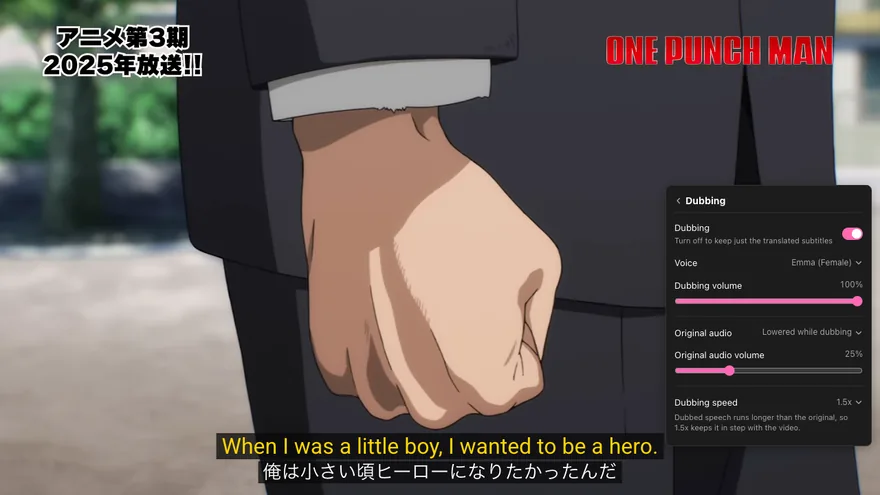
About speed: dubbed lines often run longer than the Japanese. AutoDub speeds the voice up a little when a line is long and, if it still won’t fit, briefly slows the video. If you notice the video slowing in rapid-fire scenes, raise Dubbing speed to 1.8x or 2.0x.
What about YouTube’s own dubbing?
YouTube can auto-dub Japanese videos into English, but only when the channel has the feature on and the video qualifies. YouTube skips videos longer than 120 minutes, videos that are mostly music and videos with copyrighted content, according to its automatic dubbing help page (checked ).
When a video does have dubbed tracks, you’ll find them under Settings → Audio track, as YouTube’s audio language guide explains. The One-Punch Man upload above had no audio track menu at all, so AutoDub was the way to hear it in English. More on how YouTube’s automatic dubbing works.
Donghua, recaps and the rest
Donghua. The two official donghua channels in the table carry 13 and 23 subtitle tracks. Pick your language in AutoDub and it voices the matching track: Coiling Dragon in Spanish uses Tencent’s own Spanish subtitles.
Recaps and story channels. Anime, films, dramas and story recaps make up about a quarter of the videos people dub with AutoDub. Narrated recaps work especially well: one narrator, one voice.
Interviews and behind the scenes. Voice-actor talks, studio documentaries and anime news shows work the same way as any other YouTube video. For the general setup, see how to translate a YouTube video.
Translating anime on YouTube: common questions
Can AutoDub translate anime into English?
Yes. Open the episode on YouTube, click the AutoDub icon in the player and choose English. AutoDub translates the dialogue with AI and reads it in a natural voice.
Does each character get a different voice?
No. AutoDub reads all the dialogue in one voice per language, the one you pick under Dubbing. You can switch voices at any time, and the new voice starts with the next line.
Can I keep the Japanese voices and just read subtitles?
Yes. Open Dubbing and switch it off. You’ll get the translation and the original line on screen, and the audio stays exactly as it is.
Will it read out [Music] or sound effects?
No. Sound labels like [Music] show up between lines but are never spoken, and short labels in parentheses at the start or end of a line are skipped by the voice.
The dialogue is too fast. What should I change?
Raise Dubbing speed on the Dubbing page to 1.8x or 2.0x. The default is 1.5x, and a faster voice means AutoDub needs to slow the video down less often to let a line finish.
Do I need to download the episode?
No. AutoDub works inside the YouTube player while you watch, so there’s no video file to download or upload.
Which languages can I hear anime in?
Any of 42, including English, Spanish, Portuguese, Hindi, Arabic, Indonesian and Vietnamese.
Is AutoDub free?
Yes. Dubbing and dual subtitles are free, with no account, API key or daily video limit.